Using MCP servers with Nouswise
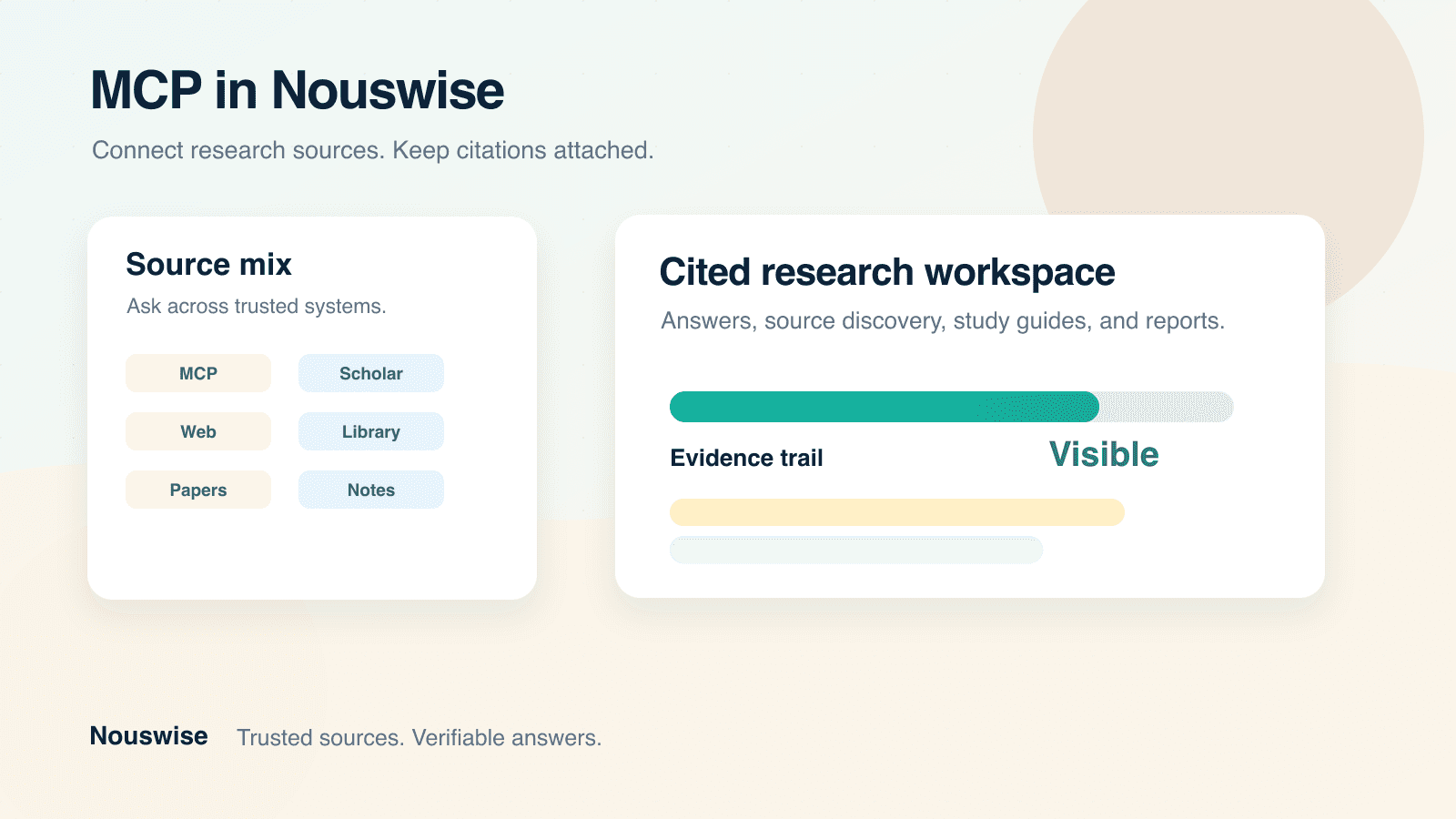
Use MCP in Nouswise to turn scattered work and research sources into cited outputs
Most teams, students, and researchers do not have a knowledge problem. They have a source-traceability problem.
The useful information is already somewhere: a CRM note, a GitHub issue, a database row, a policy document, a research paper, a lecture PDF, a lab protocol, a vendor page, a support ticket, or a source someone saved six months ago. The hard part is turning those scattered sources into work you can trust, reuse, and defend.
That is where Model Context Protocol, or MCP, becomes valuable inside Nouswise.
MCP lets Nouswise connect to external tools and knowledge systems. Nouswise then makes those systems useful in research and learning workflows: ask questions in a workspace, combine MCP with Scholar, Web, and your own library, keep citations attached to answers, and discover new sources that can be imported into a project.
The practical promise is direct: connect the systems where work, research, and learning already happen, ask one question across them, and turn the cited result into a brief, report, slide deck, study guide, literature matrix, annotated bibliography, or follow-up source collection.
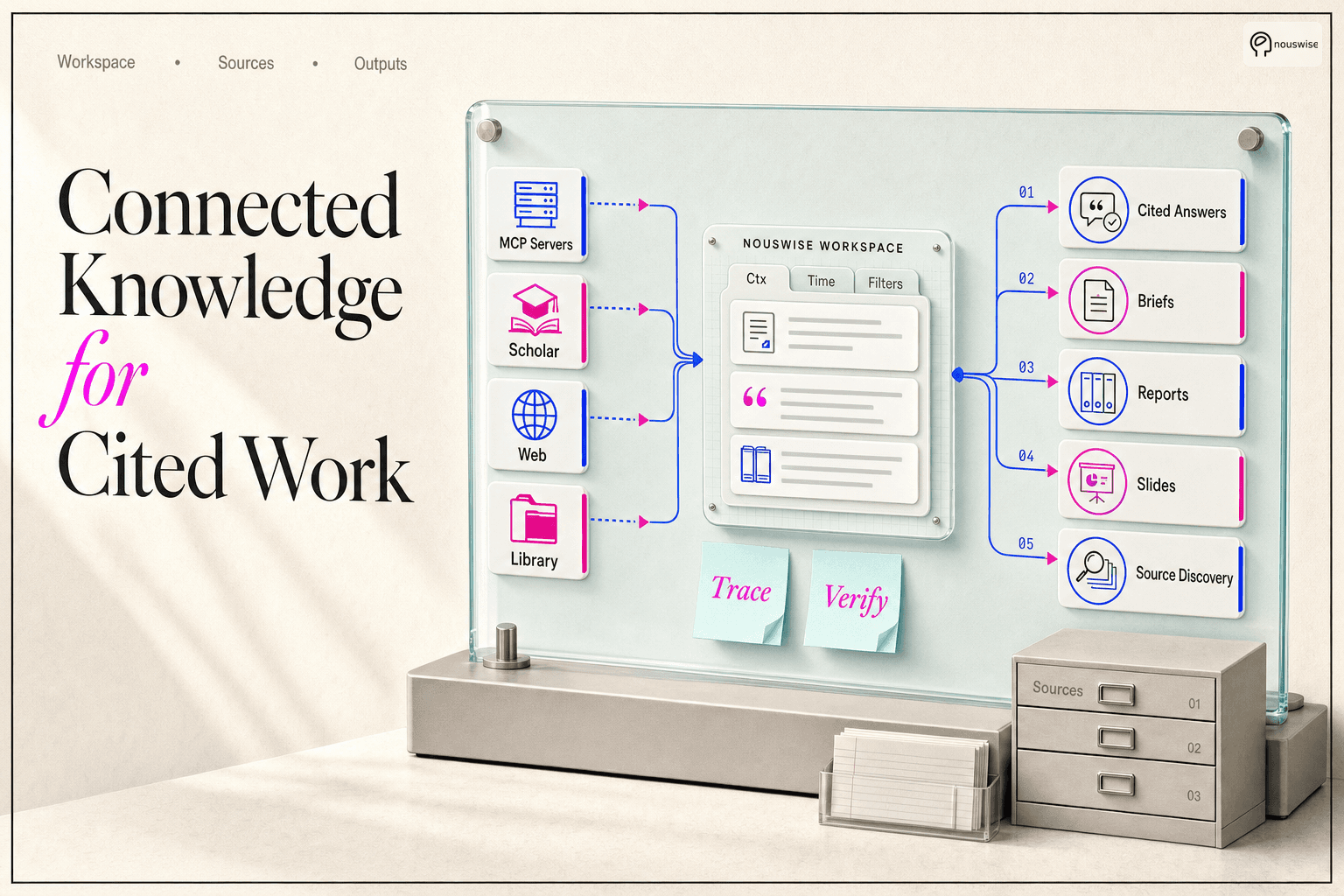
What changes when MCP is connected
Without MCP, users often export files, copy snippets between tabs, paste context into a chat box, and then manually check whether the answer matches the original source. That is slow, fragile, and hard to repeat.
With MCP in Nouswise, users can keep the source system connected and ask from the project workspace. The answer can draw from MCP plus Scholar, Web, and uploaded library sources, while preserving citations that make the result easier to verify and reuse.
Before | With MCP in Nouswise |
|---|---|
Search each system separately. | Ask one workspace question across connected systems and project sources. |
Paste context into a generic AI tool. | Keep evidence inside a cited research workflow. |
Lose the trail back to the source. | Inspect citations from answers and generated outputs. |
Rebuild the same context for every task. | Import useful discovered sources and reuse them in the project. |
Treat AI output as a draft only. | Turn cited answers into reports, slides, briefs, study guides, literature reviews, and decision notes. |
A good first result should feel concrete. For example, after connecting one MCP server, a user should be able to produce one of these within a project:
A cited account brief before a customer call.
A product feedback summary tied to tickets, notes, and roadmap files.
A source-backed research brief that blends internal and public evidence.
A literature review matrix that compares papers by method, evidence, and limitations.
A study guide, quiz, or flashcard set grounded in assigned readings.
A compliance gap summary tied to policies and control records.
A source discovery table that turns scattered leads into importable project sources.
What MCP means in Nouswise
MCP is a standard way for AI applications to connect to external tools, resources, and prompts. In plain language: an MCP server gives an AI workspace a controlled way to ask another system for information or action.
In Nouswise, that matters because MCP is not treated as a separate developer toy. It becomes part of the same research workflow as your uploaded files, web sources, Scholar results, and project library.
You can use MCP in three practical ways:
Use MCP through the API when you want a programmatic response that can call a remote MCP server and preserve citations from MCP results.
Add MCP servers as workspace connections so your team can use them as data sources inside Nouswise.
Use MCP during source discovery, then import eligible discovered HTTPS resources into a project as reusable sources.
The value is simple: users do not only get an answer. They get an answer with a trail back to the systems and sources that produced it.
Why citations change the value of MCP
A normal AI answer is easy to generate and hard to trust.
A cited Nouswise answer can be checked. If the answer refers to a CRM account, a paper, a web page, a PDF, or an MCP tool result, the user can inspect the supporting source. That matters because most serious work does not end at the first answer. The answer becomes a report, an email, a slide deck, a decision brief, a study guide, a literature review, a vendor review, or a follow-up question from a stakeholder, professor, reviewer, or team lead.
Citations make MCP useful beyond the initial chat because they help users:
Verify where a claim came from.
Reuse evidence in reports and presentations.
Compare internal sources with public sources.
Reduce the risk of confident but unsupported answers.
Build project knowledge that can be revisited later.
The mixed-source workflow
The strongest way to use MCP in Nouswise is not to ask MCP alone. It is to combine MCP with the other source types already available in the workspace.
Example mixed-source question:
Using our connected product feedback MCP server, the uploaded customer interview notes, scholar sources on retrieval-augmented generation, and recent web sources, summarize the three strongest product opportunities for enterprise knowledge teams. Cite every claim.
A useful answer might combine:
MCP: customer feedback records, CRM notes, product backlog items, issue tracker data, or database records.
Scholar: published research, academic papers, and technical literature.
Web: current public pages, documentation, market pages, standards, or news.
Library: uploaded PDFs, project notes, prior reports, internal docs, and source files.
That combination is more valuable than any single source layer. MCP brings private operational or research context. Scholar and Web add external validation. The library adds the user’s existing evidence. Nouswise ties them together with citations.
Why this matters for researchers and students
Students and researchers already use AI for explanations, outlines, feedback, source discovery, and writing support. The trust problem is that academic work cannot stop at a fluent answer. A useful academic answer needs sources, page-level or paragraph-level evidence, and enough structure to help the user learn, compare, and defend the work rather than simply submit text.
Recent student AI research points to the same conversion lesson: adoption is not the hard part; trust, attribution, and responsible use are. For students, the product should feel like a study and verification layer. For researchers, it should feel like a faster way to compare sources without losing the evidence trail.
MCP in Nouswise is valuable for academic work when it connects research systems and saved source libraries to the same cited workspace where Scholar, Web, PDFs, datasets, and notes already live. That makes the workflow less about "write this for me" and more about "help me understand, compare, verify, and reuse my sources."
Useful academic outputs include:
Literature review matrices.
Annotated bibliographies.
Source comparison tables.
Research-question maps.
Method and limitation summaries.
Seminar discussion briefs.
Thesis proposal outlines.
Evidence-backed study guides.
Quizzes and flashcards grounded in assigned readings.
Lab or fieldwork briefing notes.
For this audience, the strongest conversion message is control: the user can see which source supports each claim, decide which sources belong in the project, and turn the same evidence into learning or research outputs without losing the citation trail. That is more persuasive than promising faster writing, because it speaks to the real academic fear: using AI without knowing whether the answer is accurate, attributable, or allowed.
Three ways to leverage MCP
1. Ask cited questions in a workspace
This is the most natural path for most users.
A user, team, or institution adds an MCP server in Settings -> Connections. The connection can use Streamable HTTP or SSE transport and can authenticate with an API key or OAuth, depending on the MCP server. Once active, the MCP server can appear as a workspace data source.
Then users can ask questions that combine MCP with other project sources.
Useful workspace prompts:
Compare the top customer complaints from our Intercom or support MCP connection with the product roadmap PDFs.
Which roadmap items address the highest-volume complaints? Include citations.
Use the GitHub MCP connection, our uploaded architecture docs, and recent web documentation.
Explain whether our planned migration creates any security or reliability risks. Cite each risk.
Use the Salesforce MCP connection, this proposal folder, and public competitor pages.
Draft a client-ready account brief with evidence for each recommendation.
Use my research-library MCP source, Scholar, Web, and the uploaded course readings.
Build a literature matrix on retrieval-augmented generation in education. For each source, cite the method, population, main finding, and limitation.
Use a trusted reference-library or PubMed-style MCP source, Scholar, and my uploaded notes.
Explain which papers are foundational, which are recent, and which disagree. Cite every comparison.
Best for:
Product managers synthesizing feedback, issues, and research.
Customer success teams preparing account reviews.
Consultants turning client systems and documents into reports.
Engineering teams combining code/tool context with docs and incident notes.
Operations teams asking across systems that do not normally live in one search index.
Researchers comparing papers, methods, datasets, and notes.
Students turning assigned readings into cited explanations, study guides, quizzes, and flashcards.
2. Use MCP through the API
Technical teams can call the Nouswise API with MCP tools enabled. This is useful when you want MCP-backed answers inside another product, workflow, dashboard, internal assistant, or automation.
A simplified request shape looks like this:
When the model uses an MCP tool, the response can include MCP call output and citation annotations. That makes the API useful for applications that need more than plain generated text. They can display a final answer and keep the source trail available for audit, review, or user inspection.
API use cases:
Build an internal analyst assistant that cites CRM or ticketing data.
Add MCP-backed evidence summaries to a dashboard.
Generate account briefs, incident summaries, or research memos in the background.
Let a product workflow call approved business systems without building custom retrieval logic for every system.
3. Discover new sources with MCP, then import them
Sometimes the user does not know which sources belong in a project yet.
That is the purpose of Discover Sources. Nouswise can use available source tools, including MCP, Web, Scholar, and library search, to produce an importable table of candidate sources. The user reviews the table, selects relevant rows, and imports supported sources into the project.
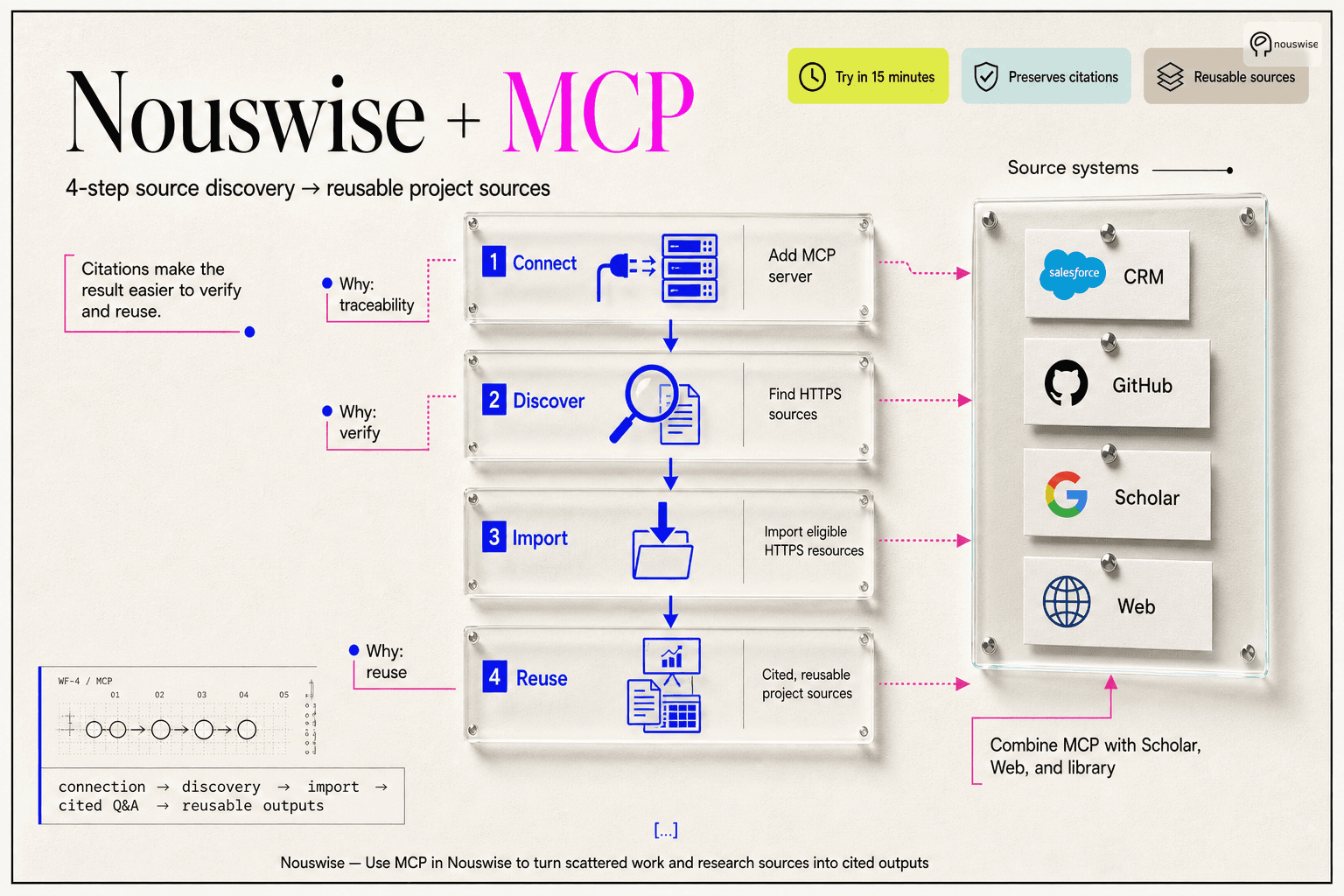
This is especially valuable when an MCP server returns resources with HTTPS URIs. If the resource points to a web-fetchable source, Nouswise can import it so future questions can use it as a normal project source.
A useful Discover Sources prompt:
Find 30 sources that would strengthen this project about enterprise AI knowledge workflows.
Prioritize sources that explain buyer behavior, citation trust, MCP adoption, and knowledge worker pain points.
Use our connected research MCP server, Scholar, Web, and the existing project library.
What the user gets back:
A table of candidate sources.
A citation for each source candidate.
A review step before import.
Imported sources that can be reused in later cited answers and outputs.
This turns source discovery from a manual search task into a review workflow.
How it works behind the scenes
At a high level, the flow looks like this:
A user or developer provides an MCP server URL, server label, transport, and authentication details.
Nouswise connects to the MCP server and discovers the available tools.
When a workspace question or API request needs that system, the model can call the relevant MCP tool.
Nouswise formats the MCP result, preserves useful metadata such as the server label, tool name, connection, and source URL when available, and makes the result available to the answer.
When the final answer cites an MCP-backed result, the citation can point back to the supporting tool output or imported source context.
In Discover Sources, selected citation-backed rows can be imported when the underlying source can be resolved, including web-fetchable HTTPS resources.
That is why the user experience feels simple while still being useful for technical and operational teams. The user asks a question, but the system can preserve the evidence path behind the answer.
Real workflows that show the value
Role | MCP source | Combined with | Output | Why it matters |
|---|---|---|---|---|
Product manager | Linear, Atlassian Jira, GitHub, Intercom/support tickets | Customer interview PDFs, Scholar, Web | Product opportunity brief | Combines operational feedback with external evidence. |
Customer success lead | CRM and support history | Contract docs, uploaded notes, public account news | Account review memo | Gives the team a cited view of risks, wins, and next actions. |
Consultant | Client knowledge base or project tracker | Client uploads, web sources, industry reports | Client-ready report or slide deck | Turns private client context into evidence-backed deliverables. |
Engineering lead | GitHub, Sentry, ServiceNow incidents | Architecture docs, runbooks, postmortems | Incident review or migration risk brief | Grounds technical recommendations in actual system evidence. |
Compliance team | ServiceNow risk/compliance data or a controls database | Policies, regulations, audit evidence | Control gap summary | Makes claims traceable to policies and source records. |
Research analyst | Internal research MCP server | Scholar, Web, PDFs, datasets | Market landscape or literature review | Combines private research inventory with external sources. |
Graduate researcher | trusted reference-library MCP source, PubMed/arXiv-style MCP source, or internal lab repository | Scholar, PDFs, datasets, notes | Literature matrix or annotated bibliography | Makes source comparison faster without losing evidence traceability. |
Student | Course LMS, reading list, reference library, or uploaded lecture materials | Assigned PDFs, Scholar, Web | Study guide, quiz, flashcards, seminar brief | Turns assigned material into cited learning outputs that support understanding, revision, and class preparation rather than blind copying. |
Sales team | CRM, call notes, enablement system | Proposal docs, competitor pages, product library | Deal strategy brief | Helps a rep prepare with evidence instead of scattered notes. |
Educator or trainer | LMS or content repository | Uploaded readings, Scholar, web references | Study guide, quiz, flashcards | Turns distributed learning material into cited learning outputs. |
Example workflow: product research
A product team wants to decide whether to build a new enterprise search feature.
Before MCP, the team might search customer tickets, read interview notes, skim competitors, ask an analyst to find research papers, and manually paste fragments into a document.
With MCP in Nouswise, they can connect the operational systems and ask:
Use support-ticket MCP data, the uploaded interview notes, Scholar, and recent web sources.
Identify the top five evidence-backed reasons enterprise teams struggle with internal knowledge search.
For each reason, cite at least one internal source and one external source when available.
Then recommend which issue we should address first.
The result is not just a summary. It is a decision brief with internal and external evidence side by side.
Why this is valuable:
The user sees a direct path from scattered data to a decision.
Citations make the output safer to share with stakeholders.
The same evidence can later become slides, reports, or project notes.
Example workflow: account intelligence
A customer success team needs to prepare for a renewal meeting.
They connect Salesforce, Intercom, or another CRM/support MCP source, add the customer’s contract and implementation notes to the project, and include web sources for public company updates.
Prompt:
Create a renewal prep brief for this account. Use CRM activity from MCP, support history,
contract notes in the project library, and recent web updates about the company. Separate
confirmed facts from recommendations and cite every factual claim.
Possible output:
Account summary.
Product usage signals.
Open support risks.
Stakeholder map.
Renewal risks.
Expansion opportunities.
Questions for the next call.
The value is not that the AI writes a memo. The value is that the memo is grounded in systems the team already uses.
Example workflow: compliance and audit preparation
Compliance work depends on traceability. A confident answer without a source is often useless.
A team can connect ServiceNow risk/compliance data or an internal controls-database MCP server, combine it with policies and audit evidence in the Nouswise library, and ask:
Compare our current access-control policy with the control records from ServiceNow or our controls MCP server.
Identify gaps, stale evidence, and controls that need updated documentation. Cite the policy
section or control record behind every finding.
The output can become a control-gap summary, an audit prep checklist, or a policy update plan.
Example workflow: literature review for a thesis or paper
A graduate student or researcher needs to understand a field before writing. The hard part is not only finding papers. It is remembering why each paper matters, how the methods differ, and which claims are actually supported.
They connect a reference-library or biomedical-literature MCP source when available, add PDFs and notes to the Nouswise project, and combine them with Scholar and Web sources.
Prompt:
Create a literature review matrix for my thesis question: how do AI study tools affect student learning outcomes?
Use my saved paper library, Scholar, and the uploaded PDFs. For each paper, extract the research question, method, sample, main finding, limitation, and how it relates to my thesis. Cite each cell where possible.
Possible output:
Literature matrix.
Foundational papers.
Recent papers.
Method comparison.
Evidence gaps.
Contradictions or unresolved debates.
Candidate sources to import into the project.
The value is not automated writing. The value is faster source understanding with a visible trail back to the evidence.
Example workflow: studying from assigned readings
A student has lecture slides, book chapters, PDFs, notes, and a few external sources. Generic AI can explain the topic, but it may invent details, overgeneralize, or drift away from the assigned material.
In Nouswise, the student can ask from the project sources and keep citations attached.
Prompt:
Use only the uploaded lecture slides, assigned readings, and any imported sources in this project.
Create a study guide for next week's exam. Start with a plain-language explanation, then make flashcards, five practice questions, and a list of claims I should verify in the readings. Cite the source behind each major point.
Possible output:
Plain-language explanation.
Cited study guide.
Flashcards.
Practice quiz.
Terms and definitions.
Weak-area checklist.
Source-backed answer key.
This is useful because students can study with the material their instructor assigned, not a generic web answer. It also gives them a safer way to use AI: ask for explanations, checks, quizzes, and evidence trails instead of outsourcing the assignment itself.
Example workflow: source discovery for a new project
A research analyst, graduate student, or consultant starts a new project with only a topic and a few notes.
They run Discover Sources:
Find the best sources for a market brief on AI knowledge work platforms. Search our research MCP server, scholar, Web, and the uploaded notes. Prefer sources that explain buying behavior, workflow pain, trust, citations, and enterprise adoption.
For an academic project, the same workflow could be:
Find foundational and recent sources for my thesis chapter on AI study tools and learning outcomes.
Search my reference-library MCP source, Scholar, Web, and uploaded notes. Prioritize sources with clear methods, student populations, outcome measures, and limitations.
Nouswise returns an importable table. The analyst selects the best candidates and imports them into the project. Future questions can now use those sources directly.
This is more useful than generic AI search because the user sees the compounding workflow.
connection -> source discovery -> import -> cited Q&A -> reusable outputs
When MCP is worth connecting
MCP is most useful when the source system has information that is:
Frequently updated.
Too large or dynamic to upload manually.
Locked inside a business, research, or learning system.
Needed together with other evidence.
Important enough that citations matter.
Good MCP candidates:
CRM records, for example Salesforce.
Support tickets, for example Intercom or support-platform MCP sources.
Project management systems, for example Linear or Atlassian Jira.
Code hosting and issue trackers, for example GitHub.
Observability and incident tools, for example Sentry or ServiceNow incidents.
Internal databases.
Knowledge bases.
Document management systems.
Research repositories.
Reference managers and paper libraries, when exposed through a trusted MCP server.
Domain literature sources, for example PubMed- or arXiv-style MCP sources where appropriate.
Course LMS or learning content systems, when an institution exposes them safely.
Risk, compliance, and controls tools, for example ServiceNow risk/compliance data or an internal controls database.
Less useful MCP candidates:
One-off static PDFs that can simply be uploaded.
Sources that do not need to be queried often.
Systems where the user cannot safely grant access.
Tools that return vague summaries without useful source metadata.
What to ask after connecting an MCP server
The best prompts make the source mix explicit.
Instead of:
Summarize customer issues.
Use:
Use the Intercom/support MCP source, the roadmap PDF, and web documentation.
Group customer issues by product area, cite representative tickets, and show which issues are already addressed by roadmap items.
Instead of:
Find sources for this project.
Use:
Use MCP, Scholar, Web, and my library to find sources that would improve this project.
Prioritize recent, credible, non-duplicate sources. Return candidates I can import and reuse.
Instead of:
Write a report.
Use:
Use the connected CRM MCP source, uploaded account notes, and public company pages.
Write a cited account brief with confirmed facts, risks, open questions, and recommended next actions.
Trust and security considerations
MCP can connect Nouswise to powerful systems, so teams should treat MCP connections as real access paths.
Practical guidance:
Connect only MCP servers you trust.
Use the narrowest access scope that still supports the workflow.
Prefer OAuth where the server supports it and where user-level authorization matters.
Use clear server labels so users know which source they are invoking.
Review citations before turning answers into client-facing or decision-critical material.
Treat MCP results as evidence to inspect, not as unquestionable truth.
The point of MCP in Nouswise is not to hide complexity. It is to make external systems usable while keeping source traceability visible.
Start with one high-value workflow
The easiest way to perceive value is to connect one system that already contains expensive context. Do not start with every possible MCP server. Start with the system people already open when decisions matter.
Good first workflows:
Connect Intercom/support tickets and ask which product problems appear most often.
Connect Salesforce/CRM notes and create a cited account brief before a customer call.
Connect GitHub, Linear, or Atlassian Jira and compare implementation reality with roadmap documents.
Connect a research repository or reference-library MCP source and discover papers to strengthen a literature review.
Connect course readings or an LMS-backed source and turn assigned material into a cited study guide.
Connect ServiceNow risk/compliance data or a controls system and compare it with policies and audit evidence.
Try it in 15 minutes
If you are evaluating MCP in Nouswise, start with a narrow workflow.
Pick one MCP server that contains high-value knowledge.
Add it in Settings -> Connections with a clear server label.
Open a project that already has a few library sources.
Ask one mixed-source question that uses MCP plus library, Web, or Scholar.
Check whether the answer cites useful evidence.
Run Discover Sources if the project needs more context.
Import the best discovered sources and ask a follow-up question.
FAQ
Why not just upload exports from every system?
Uploads are useful for static documents. MCP is better when the source changes often, is too large to export cleanly, requires scoped access, or needs to be queried on demand.
Closing
MCP is most convincing in Nouswise when users see the whole workflow:
connect systems -> ask across sources -> verify citations -> import discoveries -> create reusable outputs
That is the practical promise: your work and research sources become part of a cited workspace, not another isolated integration.
Written by:

Elizabeth Sims
Senior Business Developer
Share with friends: